

The eTravel Pass website may fail due to server timeouts, CAPTCHA blocks, VPN filtering, or email OTP delivery issues. Start by clearing your browser cache, switching to Firefox or Edge, and disconnecting any VPN.
Registering during off-peak Philippine hours also reduces server errors. The eTravel Pass system requires a good and stable internet connection and is accessible via personal computers and mobile devices.
If you are blocked by Cloudflare or receive a 403 Forbidden error, disable ad blockers and privacy extensions that interfere with CAPTCHA verification. Always use the government portal at etravel.gov.ph. Last updated: September 2026.
Quick Diagnostic and Immediate Fixes
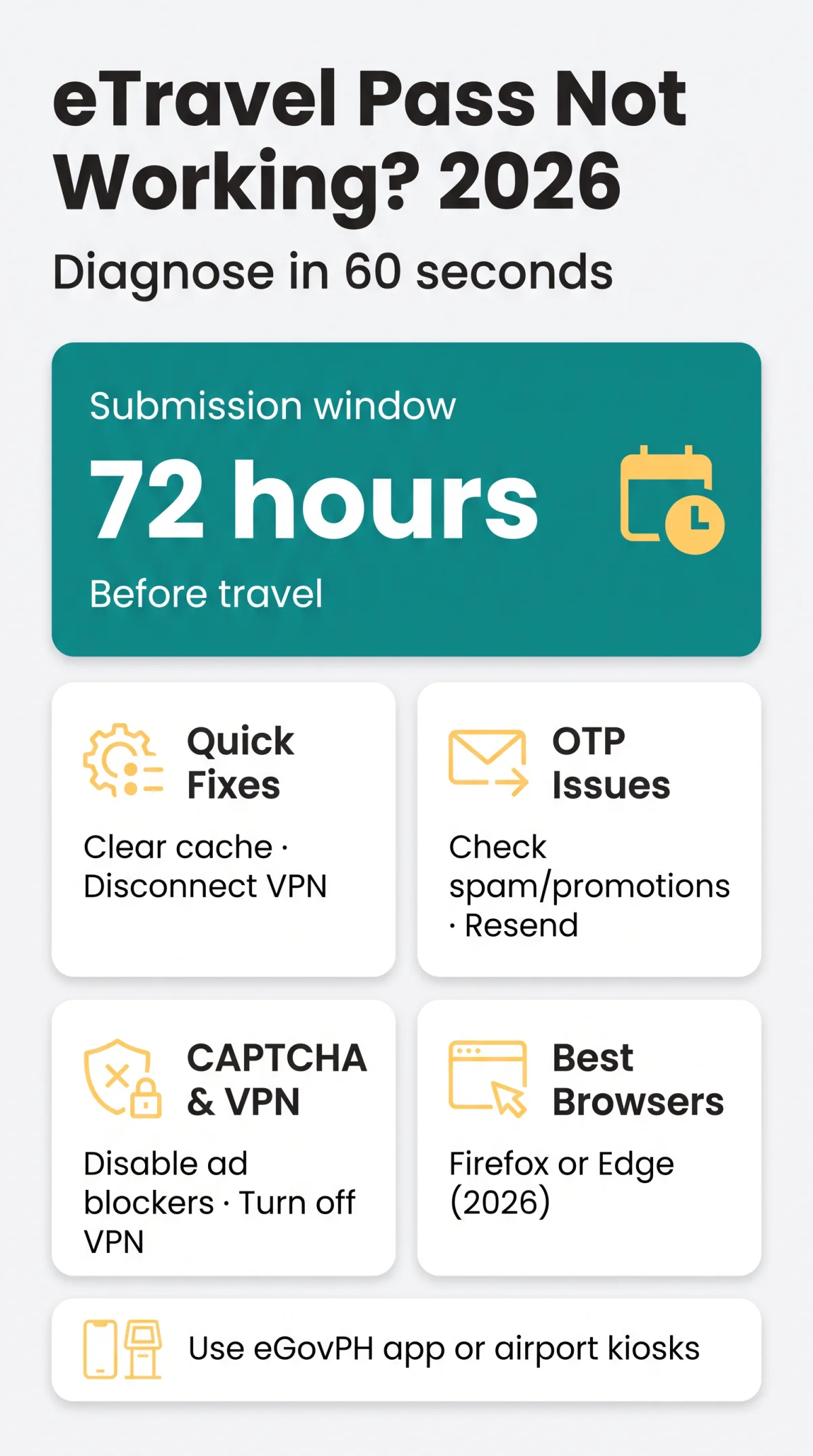
Diagnose the eTravel Pass failure in 60 seconds with this four-step decision tree:
Does the homepage load?
If no, run a speed test, then switch to mobile data. If the page still won’t open, the eTravel Pass server may be down.
Does the form submit?
If the page loads but submission fails, clear your browser cache and cookies in Chrome, Firefox, or Edge settings, then retry the eTravel Pass form.
Did you receive the OTP?
If no verification code arrives, check your spam, promotions, and quarantine folders before requesting a resend.
Is a CAPTCHA displaying?
If the verification widget loops or blocks you, disable ad blockers and any VPN, then reload the eTravel Pass page.
If these steps don’t resolve the issue, switch to a different device entirely. The eTravel Pass platform is mobile-responsive, so trying a smartphone or another computer often bypasses browser-level conflicts. Mozilla Firefox and Microsoft Edge are the most reliable browsers for eTravel Pass registration, based on traveller reports from 2024, verified in 2026.
eTravel Pass Registration Context and Server Timeouts
Server timeouts spike during Philippine business hours (08:00-17:00 PHT / 00:00-09:00 BST); register outside this window. The eTravel Pass platform at etravel.gov.ph is free of charge and requires submission within 72 hours (3 days) prior to arrival or departure. The system operates under the Ease of Doing Business Law (R.A. 11032) and includes the Electronic Health Declaration Card (eHDC) as an essential part of health surveillance.
Two distinct HTTP errors affect the eTravel Pass system. HTTP 403 Forbidden originates at the edge security perimeter (WAF/Cloudflare) when VPN IPs or malformed headers trigger bot detection. HTTP 405 Method Not Allowed occurs at the application level when a form POST request fails due to an expired session or broken navigation script.
| UK Time (BST) | Philippine Time (PHT, UTC+8) | Server Load |
|---|---|---|
| 09:00-17:00 | 17:00-01:00 | Low |
| 17:00-23:00 | 01:00-07:00 | Lowest |
| 00:00-09:00 | 08:00-17:00 | Highest |
OTP Delivery Failures and Email Troubleshooting
Check these folders before requesting a resend for OTP verification: Gmail – Promotions/Updates; Outlook – quarantine; Yahoo – spam.
- Gmail: Check the Promotions and Updates tabs, not just the primary inbox.
- Outlook / Microsoft 365: Review the quarantine folder where automated filters often redirect government-domain messages.
- Yahoo: Check your spam folder for the code from etravel.gov.ph.
- Whitelist etravel.gov.ph in your email settings to prevent future OTP delivery failures on the eTravel Pass platform.
- OTP expired? Request a resend; if repeated attempts fail, create a new account or use the Forgot Password link at etravel.gov.ph/signin.
- Account recovery: Retrieve your eTravel Pass profile at etravel.gov.ph/search using your reference number and date of birth.
CAPTCHA, VPN Blocks, and Bot Detection
CAPTCHA failures on eTravel Pass are caused by VPN, ad blockers, or Google Translate overlay. Disable all three and reload.
Ad Blockers, Privacy Extensions, and CAPTCHA Conflicts
Extensions like uBlock Origin or Brave Shields strip scripts the CAPTCHA puzzle needs to render. Disable these extensions for the eTravel Pass session, then reload the page. The Google Translate browser overlay must also be disabled, as it breaks the puzzle security check.
VPN and Proxy IP Blocking by Philippine Government Servers
If you see a Cloudflare “Access Denied” page, extract the Cloudflare Ray ID from the error page and include it when contacting the site operator.
Step-by-Step Fix Sequence
Disconnect your VPN entirely
Turn off any commercial VPN or proxy connection.
Flush your DNS cache
Clear stored DNS records to remove any blocked IP references.
Retry the eTravel Pass website on the same browser
Reload etravel.gov.ph after applying the above fixes.
Switch to mobile data if the block persists
Use your cellular connection to bypass any IP-level filtering.
Use the eGovPH app as an alternative access method
Download the eGovPH app to complete your eTravel Pass registration.
Browser Compatibility and Common Form Errors
Use Firefox or Edge. Chrome works only after disabling privacy extensions.
| Browser | Status | Known Issues | Recommendation |
|---|---|---|---|
| Mozilla Firefox | Confirmed working | None reported | Primary choice |
| Microsoft Edge | Confirmed working | None reported | Reliable alternative |
| Google Chrome | Works with caveats | Privacy extensions break CAPTCHA | Disable uBlock Origin, Brave Shields |
| Safari | Unverified | Untested on platform | Switch to Firefox or Edge |
eTravel Pass upload failures come from HEIC format incompatibility. Convert iPhone photos to JPEG or PNG before uploading. Session timeouts erase unsaved data, so complete each page before navigating away.
Name field validation rejects hyphenated surnames and accented characters unless they match passport-exact spelling. The eTravel Pass system blocks manual flight number entry, requiring selection from the drop-down menu only. Hotel names are similarly restricted to a pre-set list. If the “Continue” button sticks when updating your arrival date, abandon the original application and submit a new one from scratch.
Alternative Access and Emergency Registration Options
Fallback: eGovPH app or BOQ kiosks at NAIA, Mactan-Cebu, Clark.
- eGovPH app: Download the eGovPH app as an alternative mobile access method for the eTravel Pass registration system when the web portal remains unresponsive.
- Airport BOQ assistance desks: BOQ help desks are available at NAIA Terminals 1-3 in Manila, Mactan-Cebu, and Clark airports for on-arrival registration support.
- Transit passengers: Travellers with connecting flights who do not clear Philippine immigration may not need eTravel Pass registration. Confirm this exemption with your airline before departure.
- Edit existing registration: Retrieve your record via the eTravel Search Portal at etravel.gov.ph/search using your reference number and date of birth. Select the “Edit Registration” tab; modifications are permitted only before BOQ and Bureau of Immigration processing begins.
- Report scam websites: Report fraudulent registration portals to the Cybercrime Investigation and Coordinating Center (CICC) at cicc.gov.ph/report.
FAQ
How do I check if the eTravel Pass website is down for everyone?
Check etravel.gov.ph from another device or browser. If the eTravel Pass site loads partially or shows a temporary system error, the issue may be server-side. You can also test the platform via the eGovPH mobile app to confirm if the web portal is down.
Why does the eTravel Pass website say 403 Forbidden when I try to access it?
A 403 Forbidden error means your connection was blocked by a security filter. This is often caused by a commercial VPN, a datacenter IP, or malformed browser headers. Fix: disconnect your VPN, flush your DNS, or switch to mobile data. If blocked, extract the Cloudflare Ray ID and include it when contacting the site operator.
I am not receiving the OTP email. What should I do?
eTravel OTP emails are frequently filtered into spam, promotions, or quarantine folders. Check these folders in Gmail, Outlook, or Yahoo. Whitelist the etravel.gov.ph domain in your email settings to ensure future delivery. If the OTP has expired, request a resend. If delivery continues to fail, contact customer support for further assistance with your eTravel Pass account.
Can I use the eGovPH app instead of the website?
Yes, the eGovPH app is the government’s alternative mobile access method for the eTravel Pass system. It provides a more stable session and is available for download on mobile devices. If the web-based platform at etravel.gov.ph is unresponsive or timing out, switching to the eGovPH app is the recommended fallback to complete your registration.
Which browser works best with the eTravel Pass website?
Mozilla Firefox and Microsoft Edge are confirmed as the most stable browsers for accessing the eTravel Pass website in 2026. Google Chrome works but requires disabling privacy extensions that interfere with CAPTCHA verification. Safari is currently unverified and may present compatibility issues. Always clear your browser cache before attempting to submit the eTravel form.
Does the eTravel Pass cost money?
No, the eTravel registration is completely free of charge. The Philippine Travel Information System does not collect or require any payment for account creation or form submission. If you encounter a site demanding payment, it is a fraudulent registration website. Report such scam websites to the Cybercrime Investigation and Coordinating Center at cicc.gov.ph/report.
I am in the UK. Do I need a VPN to access eTravel Pass?
No, you do not need a VPN to access the eTravel Pass website. Commercial VPNs often cause access failures because Philippine government firewalls blacklist datacenter and VPN IP ranges. If you are using a VPN, disconnect it, flush your DNS, and retry the connection using your standard UK residential IP or mobile data.
What happens if I arrive in the Philippines without an eTravel QR code?
The eTravel QR code must be shown to your airline representative prior to boarding your flight. A Green QR means proper submission and allows direct clearance to immigration. A Red QR means incomplete data or health flags, requiring mandatory BOQ inspection before immigration. Take a screenshot or download your QR code after eTravel Pass registration to avoid delays. Philippine airports like NAIA Terminals 1 to 3, Mactan-Cebu, and Clark provide airport kiosks and Bureau of Quarantine assistance desks for on-arrival registration support.
Can I edit my eTravel Pass registration after submitting it?
Yes, you can edit your registration by using the eTravel Search Portal at etravel.gov.ph/search. You will need your reference number and date of birth to retrieve your profile. Navigate to the Edit Registration tab. Modifications are permitted only prior to processing and verification by the Bureau of Quarantine and the Bureau of Immigration.