

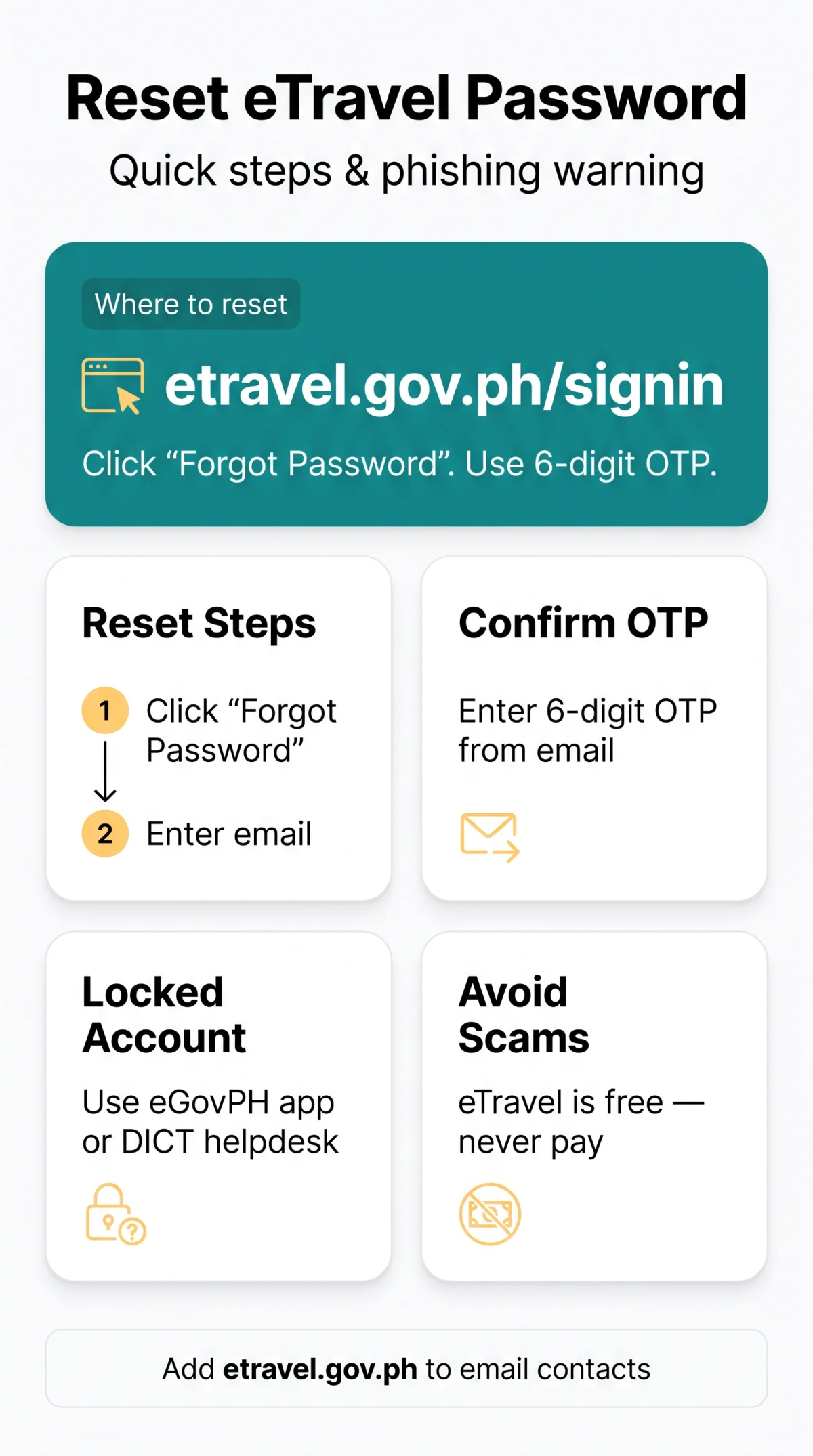
To reset a forgotten eTravel Pass Philippines forgot password issue in 2026, go to etravel.gov.ph/signin, click “Forgot Password”, enter your registered email, and follow the 6-digit OTP verification link to create a new password. If your account is locked, contact eTravel support via the eGovPH app or DICT helpdesk. eTravel is free, governed by the Ease of Doing Business Law (R.A. 11032).
This is an informational guide for UK travellers, not affiliated with the Philippine government. Always verify procedures at etravel.gov.ph. Last updated: 14 September 2026.
How to Reset Your eTravel Password (Step-by-Step)
To reset your eTravel Pass password in 2026, go to etravel.gov.ph/signin, click “Forgot Password”, enter your email, and use the 6-digit OTP to create a new password.
Go to the sign-in page
Visit https://etravel.gov.ph/signin.
Click “Forgot Password”
Click the “Forgot Password” hyperlink below the login form.
Enter your registered email
Enter your registered email address and click “Submit”.
Check your inbox for the OTP
Check your inbox for a 6-digit OTP from etravel.gov.ph.
Enter the OTP
Enter the OTP on etravel.gov.ph/forgot-password.
Create a new strong password
Create a new strong password, re-type it to confirm, and submit. eTravel is free – no payment is required at any stage.
Reset Password via the eGovPH App
The eGovPH app (a linked alternative) lets you reset your eTravel Pass password when the website is inaccessible or VPN-blocked. Download eGovPH, link your eTravel account, and follow the in-app password reset flow to receive a mobile OTP and restore access.
Didn’t Receive the Reset Email?
- Check your spam or junk folder for the eTravel Pass password reset email
- Add etravel.gov.ph to your email contacts or whitelist
- Disable your VPN, ad blockers, or privacy browser extensions
- Try a different browser or incognito mode
If the reset link never arrives, your registered email may have been entered incorrectly during sign-up. Contact the eTravel support team for assistance.
What to Do When Your eTravel Account Is Locked or Suspended
eTravel accounts lock after multiple failed attempts in 2026. Temporary lockouts auto-resolve; permanent suspensions require a support appeal.
| Trigger | Duration | How to Resolve |
|---|---|---|
| Multiple failed login attempts | Temporary; auto-resolves after cooldown | Wait for the cooldown period to pass, then retry with the correct password |
| Data integrity issue or policy violation | Permanent suspension | Contact eTravel support with documentation to appeal |
An “Account not found” error during password reset indicates a wrong email was entered or the account was deleted. The eTravel system does not offer a guest login fallback – you must log in to complete any travel declaration.
Can’t Access Your Registered Email?
If your registered email is inaccessible, use the eGovPH app for alternative email verification or create a new account with a different email. UK travellers should avoid temporary, work, or university email addresses for eTravel registration.
Session Timeout & Common Technical Errors
The portal auto-logs out after inactivity. HTTP 403 errors are often caused by VPNs or ad blockers – disable them or switch browsers.
How to Spot and Avoid eTravel Phishing Scams
eTravel registration is free in 2026. Any email or website demanding payment or using urgency is a phishing scam targeting your eTravel Pass login credentials.
- Fake URLs such as , , or impersonate the real domain. Always verify the address bar reads exactly https://etravel.gov.ph
- Fee demands – eTravel is free; any request for payment is fraudulent
- Urgency or threats (“your account will be deleted”) pressuring immediate action
- Misspelled sender addresses or generic greetings (“Dear User”)
- Suspicious links or unexpected attachments in emails claiming to be from eTravel
Example of a phishing email: sender “” with subject “URGENT: Your eTravel account will be deleted within 24 hours”. The legitimate eTravel sender is always @etravel.gov.ph.
Where to Report Phishing Attempts
- Report to Action Fraud UK at or by phone
- Report to the Philippine DICT or NBI Anti-Cybercrime Group
- Forward suspicious emails to your email provider’s abuse team
- Screenshot and preserve all evidence before reporting
Protecting Your Data & Getting eTravel Support
In 2026, eTravel encrypts data via HTTPS, but UK travellers should note that passport and health declaration details are transferred outside the UK and stored by the Philippine government under R.A. 11032.
The system encrypts your data – passport details, health declaration, travel itinerary, digital selfie, and flight number – via HTTPS. Enable 2FA on your linked email and clear your browser cache after using public computers.
Support via the DICT helpdesk, Bureau of Immigration, or the app responds within 24-48 hours. Prepare your account email, passport number (last 4 digits), travel dates, and any error screenshots before contacting support.
FAQ: eTravel Pass Password Reset, Account Recovery & Security in 2026
Answers to common eTravel Pass questions, current for 2026.
How do I reset my forgotten eTravel Pass password in 2026?
Go to etravel.gov.ph/signin, click “Forgot Password”, enter your registered email, and submit. Use the 6-digit OTP received by email to create a new strong password. eTravel is free. Alternatively, use the eGovPH app to reset via a linked account.
How do I recover my mPIN in eTravel?
Select “Forgot MPIN” on the eTravel login page. Reset your MPIN using your registered email or mobile number. Follow the verification prompts to receive a reset link or code, then set a new MPIN. If you cannot access either contact method, contact eTravel support via the app or DICT helpdesk.
I forgot my eGov password, how can I reset it?
Open the eGovPH app and use its built-in password recovery flow. If your eTravel account is linked, you can authenticate through the app and reset your eTravel password without the web portal. If the app-based reset fails, contact the DICT helpdesk with your account email and passport details.
Why is my eTravel account locked after too many login attempts?
Multiple failed attempts trigger a temporary account lockout, which auto-resolves after a cooldown. A permanent suspension results from data integrity issues or policy violations and requires a support appeal. Wait for the cooldown, then retry via etravel.gov.ph/forgot-password. If the lockout persists, contact eTravel support. Expected response time is 24-48 hours.
Is eTravel Pass still required for travel to the Philippines in 2026?
As of 2026, eTravel remains the Philippine government’s digital arrival and departure declaration system, formally known as the Philippine Travel Information System, operated under the Ease of Doing Business Law (R.A. 11032). British travellers arriving in the Philippines must complete an eTravel declaration before entry. Departure registration is typically required for Filipino citizens; foreign tourists are generally exempt. Registration is free at etravel.gov.ph.
Do I need to print my eTravel QR code or is a digital copy enough?
A digital copy of your eTravel QR code on your phone is sufficient for immigration. The system issues a green QR code to continue through immigration, or a red QR code for secondary inspection. Save the QR code to your device before travel. Printing is acceptable as a backup but not required.
Is it safe to enter my passport details on the eTravel website?
The eTravel portal at etravel.gov.ph encrypts data in transit using HTTPS. UK travellers should note that passport, health declaration, travel itinerary, lodging address, digital selfie, and flight number data are transferred outside the UK and stored by the Philippine government under R.A. 11032. Use a strong unique password, enable 2FA on your linked email, and clear your browser cache after using public computers.
eTravel app or website, which is better for password reset and travel declarations?
Both the eTravel website (etravel.gov.ph) and the eGovPH app support password reset and account recovery. The website is the primary portal for travel declarations and the forgot password link at etravel.gov.ph/forgot-password. The app serves as a backup when the website is inaccessible, VPN-blocked, or if you registered via the app. If you encounter an HTTP 403 error, the app provides a reliable alternative path.